
How do you apply for a Blue Light Card? You create an account with your email address and prove where you work. Then you pay £4.99 for two years.
Blue Light Guide is an independent guide and isn’t affiliated with Blue Light Card Ltd. For your account, verification or payments, use the official Blue Light Card website or app.
A recognised work email can verify you on the spot. Otherwise you upload a work ID or payslip, and checks usually take 1 to 3 working days.
Once you’re approved, your digital card usually appears in the app within an hour. The plastic card follows by post.
Five Stages From Email to Approval
Blue Light Card’s help centre sets out the same order for everyone. The whole application happens on its website or in its app.
- Check that your role qualifies. Our eligibility guide lists every group, including retired staff.
- Create an account with your email address. If you’re told the user already exists, reset your password rather than starting again.
- Verify your employment, through a recognised work email or by uploading a document.
- Pay the £4.99 membership fee once the application is complete.
- Wait for the approval email. Your digital card usually follows within an hour.
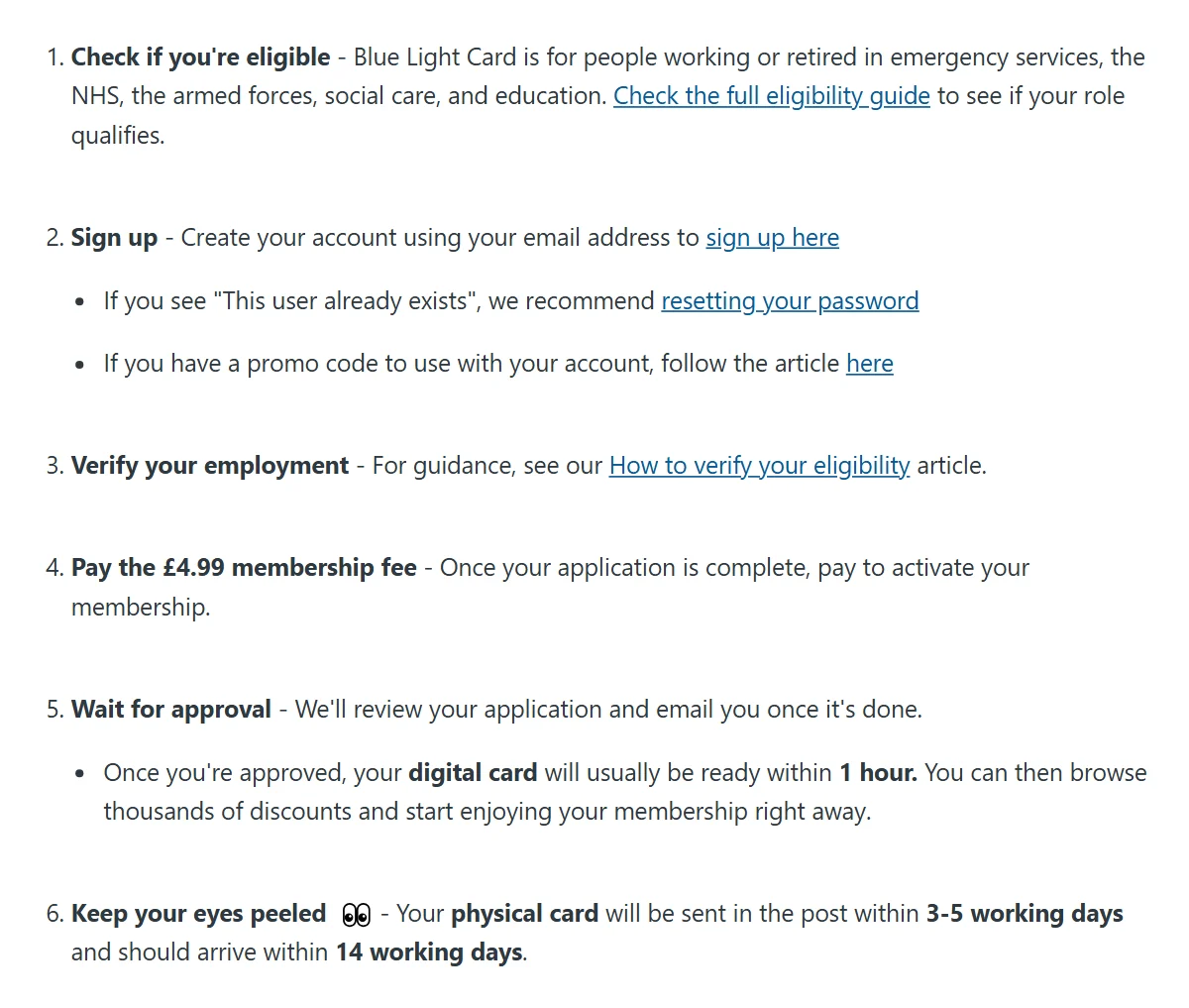
Got a promo code from your employer? Blue Light Card says a Got a Promo Code box appears when you choose your sign-up category, so enter it before you pay. Codes only come from employers, schools and approved organisations, and our promo codes guide has more on them.
Apply only on bluelightcard.co.uk or in the official Blue Light Card app. The fee is £4.99 for two years with no monthly charge, so a site asking for more isn’t the real scheme.
A Work Email Skips the Upload
There are two ways to prove your job, and one is much faster. Blue Light Card’s homepage FAQ says a recognised work email, such as an NHS or emergency services address, is verified instantly when you sign up.
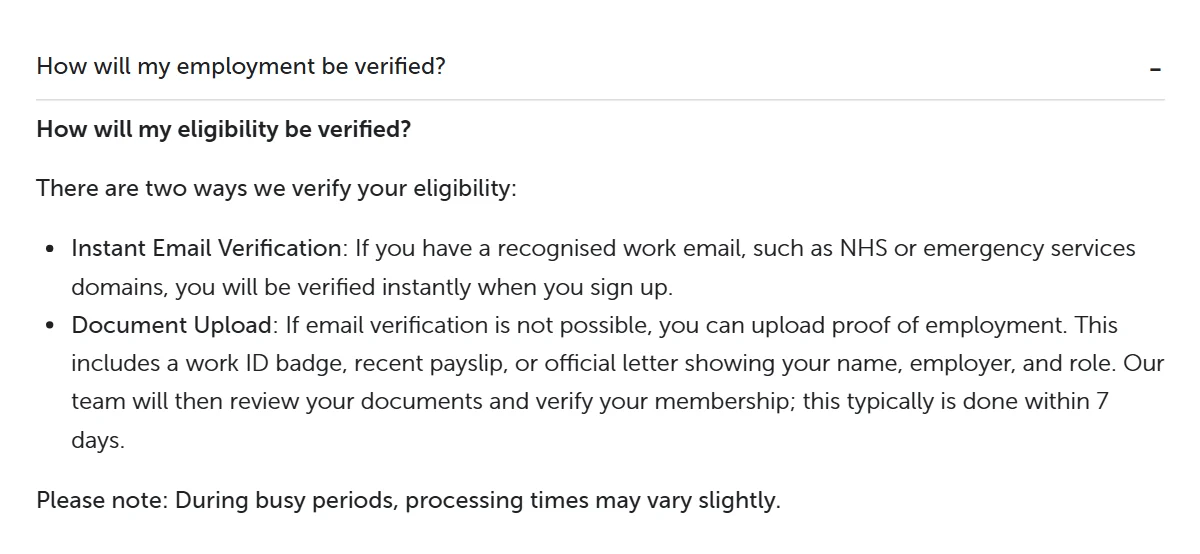
Its help centre calls the work email the quickest route for NHS and police staff. If it doesn’t work for you, you upload a document instead, and for NHS applicants the team may also check the organisation’s website.
No work email, or a personal one only? Then it’s the document route below. Retired staff use documents too, such as a pension letter.
Proof Needs Three Clear Details
Every document has to show the same three things. Blue Light Card’s upload tips list your full name, your place of work and any relevant dates.
Which documents count depends on your job. A work ID card, a recent payslip or an official letter covers most people, and the proof table in our eligibility guide shows what each group can use.
Two rules catch people out. The name on the document must match the name on your Blue Light Card account, and payslips must be dated within the last 3 months.
Photograph It Flat and in Focus
A clear photo gets through first time. Lay the document flat on a plain, dark surface, keep every edge in the frame and avoid glare from windows or ceiling lights.
The file can’t be larger than 5MB. If yours is, take a fresh photo with your camera app rather than a screenshot, or compress the image.
Hide What the Team Doesn’t Need
Blue Light Card only needs your name, organisation and dates. Its redaction guide asks you to cover everything else, such as account numbers, your address and your signature.
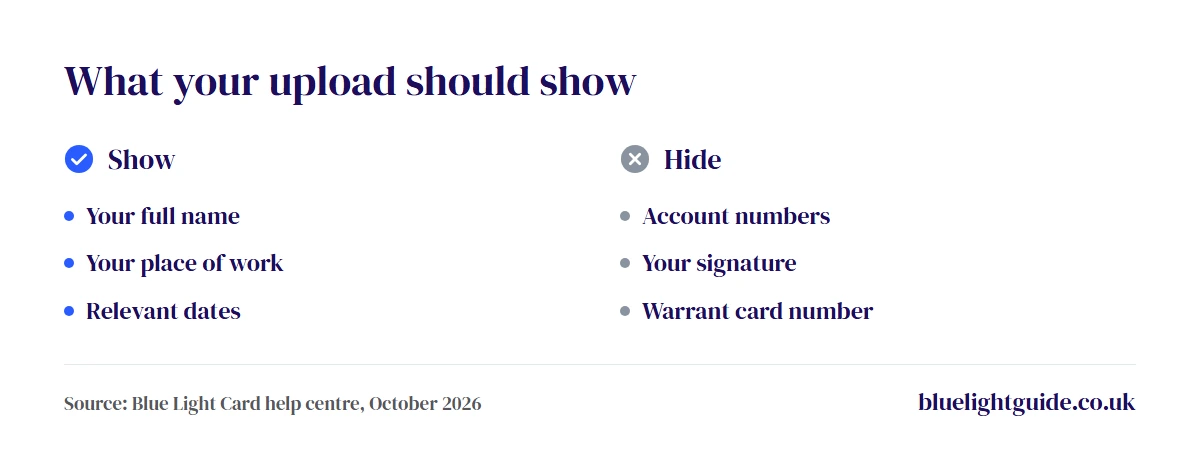
On an iPhone, the Markup tool in Photos can draw a solid box over the details. On Android, Google Photos has a Redact option in its Markup menu. Police officers should also hide their warrant card number.
Retirees Choose the Retired Option
Retired staff apply through the same form, but they pick a retired category rather than their old employer. Blue Light Card’s eligibility FAQ says retirees need at least 4 years’ service.
Retired NHS staff choose Retired NHS from the trust list and upload an NHS pension document or P60. Retired police officers choose Police, then Retired Police Service, and can use a police pension document, a P60 showing a police pension or a NARPO card.
Armed forces veterans upload one document that proves their service, such as a Certificate of Service, a Veteran ID Card or a Defence Discount Service card. Our guide for retired workers covers the other services.
How Long Does Approval Take?
With a recognised work email, approval is instant. Document checks take longer, and Blue Light Card gives two different figures.
Its eligibility FAQ says verification usually takes 1 to 3 working days once your document is in. Its homepage FAQ allows up to 7 days for a document review and warns that busy periods can stretch it.
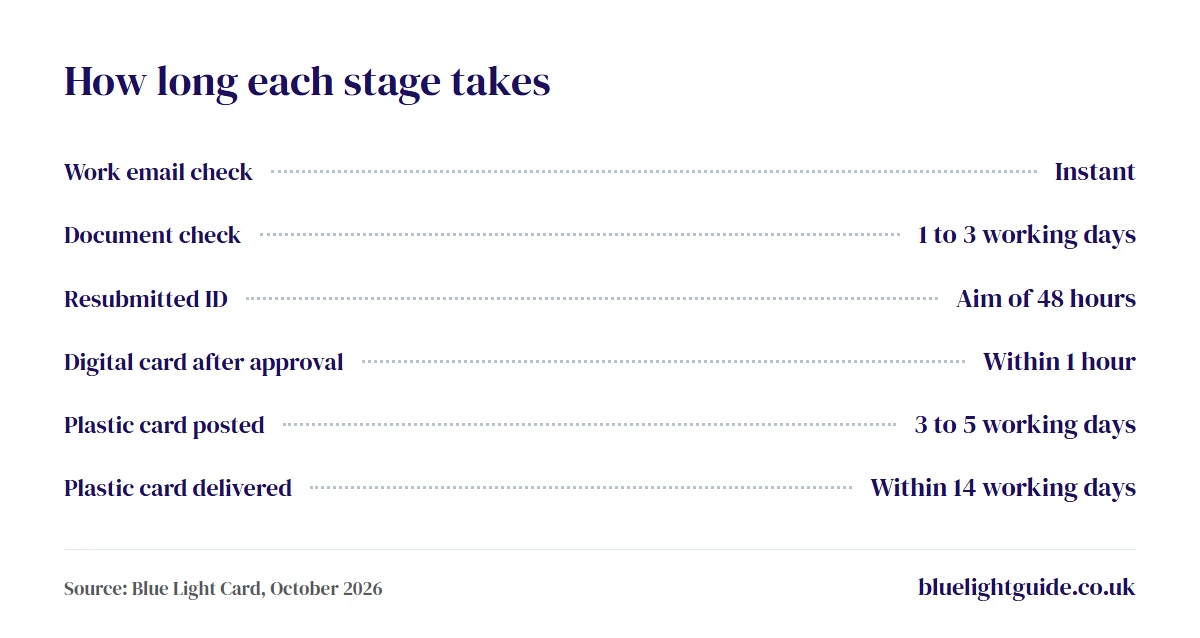
Blue Light Card emails you when the check is done. If you resubmit a document after a decline, it aims to review the new one within 48 hours.
The £4.99 is the only charge to join. Our cost guide covers renewals, refunds and replacement cards.
Four Reasons an ID Gets Declined
A decline usually comes down to the document, not your job. Blue Light Card’s help centre lists four common causes.
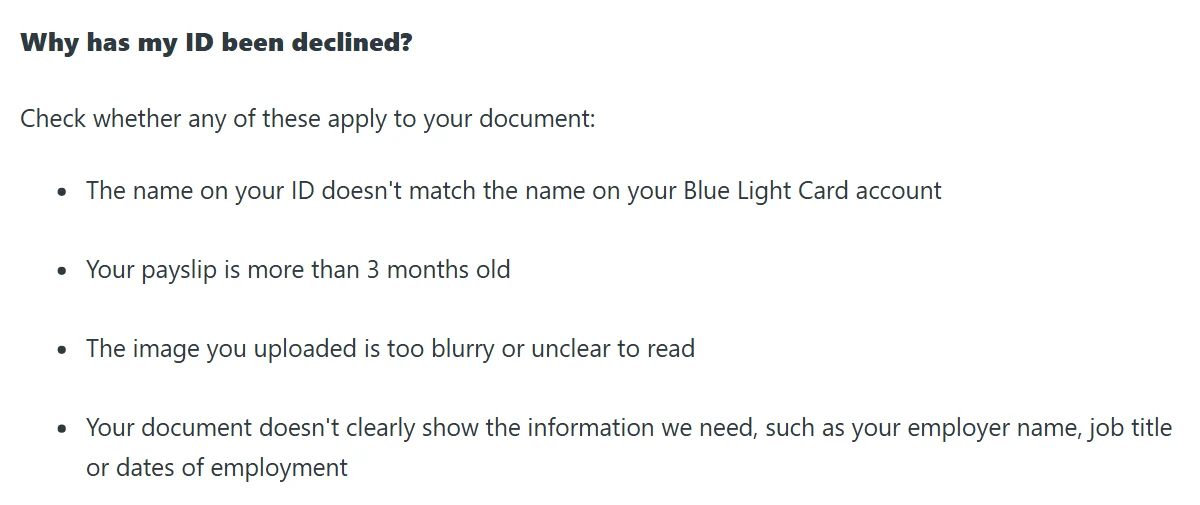
| Decline reason | The fix |
|---|---|
| Name doesn’t match your account | Use a document in your account name |
| Payslip over 3 months old | Upload one from the last 3 months |
| Blurry or unclear image | Retake it flat and in focus |
| Employer or dates missing | Choose a document that shows them |
To try again, open the Your Card section in the app or on the website and resubmit your ID. You don’t start a new application.
If the upload itself fails, check the file is under 5MB, clear your browser’s cache and cookies, then log back in and try again. The support team can advise if you don’t have any of the accepted documents.
Digital Card in an Hour
Approval unlocks the digital card first. It usually appears in the Blue Light Card app within 1 hour, so you can start browsing and using offers straight away.
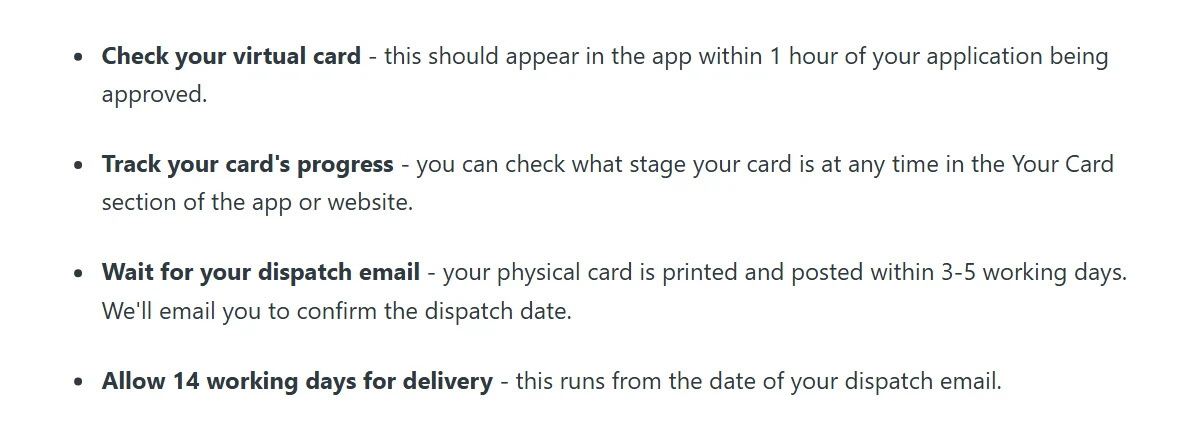
The plastic card is printed and posted within 3 to 5 working days, and Blue Light Card emails you the dispatch date. Allow 14 working days from that email for delivery, and track its progress in the Your Card section.
If it hasn’t arrived within 14 working days of the dispatch email, request a reprint in the same section. It’s free within 90 days of dispatch and costs £4.99 after that.
The card can’t go in Apple Wallet or Google Wallet yet, so keep the app on your phone. Some shops still prefer to see the plastic card at the till.
Membership lasts two years and doesn’t renew by itself. Our renewal guide explains the steps when the time comes, and our guide to what the Blue Light Card is covers how the discounts work.




Need my blue light card replaced as out of date in june 2026
Log in to your Blue Light Card account on the site or app, go to Your Card, and hit the Renew button. You’ll confirm your details, upload your work ID or verify your work email.
I’m having trouble obtaining a card.
Happy to help, but it depends where it’s going wrong. Tell me which stage you’re stuck at and I’ll point you to the fix.
If it’s verification, that’s the most common one, and it usually clears up by uploading a recent payslip or work ID showing your name and employer rather than a work email.
Please can you tell me if I am able to get a blue light card I am an ex civil servant and last worked in 1985 when I left to have my child. My husband is an ex Navy submariner also .
Good news for your husband. As an ex Navy submariner he’s an armed forces veteran, so he qualifies.
He’d apply under armed forces with a veterans’ ID, discharge papers or a service pension letter. For you it’s trickier, as Blue Light Card only covers certain parts of the civil service like the MoD, Home Office and prison or probation, not the whole thing, and you can’t get one off his service since cards are individual.
So unless your old role was in one of those areas, it won’t qualify.
Does employment in the Civil Service qualify for a Blue Light card (I worked in Plant Health (DEFRA (Dept of Food & Rural Affairs)? I am retired and have a Civil Service Pension with relevant documentation.
Afraid not. Blue Light Card only covers specific parts of the civil service, mainly the MoD, Home Office and prison or probation, not the wider service.
DEFRA and Plant Health aren’t among those, so a retired role there won’t qualify even with your pension documents. The retired route only helps if the job itself was eligible to begin with, which this one isn’t.
I’m struggling to renew my Blue Light Card. I had email reminders during August (it expired on 31 August) and tried and failed repeatedly to find the “renew” link. I wondered if I actually had to let it expire first. So I tried again on 1 September, and still no renew link. I’ve tried on two different computers and my phone – no joy anywhere.
I’ve contacted Blue Light Card via their website (there is no email or phone option) and all I get back is an automated reply telling me to go to my account and click on the renew link. The link that doesn’t appear!
Any suggestions?
Sorry, that renewal link catches a lot of people out. Try the website in an incognito or private window with your cache cleared first, since a stale login session is the most common reason the link never shows.
If that fails, don’t keep hunting for Renew, as on an expired card the route often switches to simply re-registering with your same email and details, which reactivates your account rather than signing you up as a brand new member.
So start a fresh application with your original email address and see if it picks up your existing account.
Just a question as I don’t understand, why are bus drivers not included on this list? As we were front line during lockdown taking all emergency services to and from work from the very beginning, we were out there helping and keeping public transport running and putting our lives at risk but yet we don’t get recognised for the work we did totally not appreciated.
Fair point, and it’s a common frustration. The scheme was built around the NHS, emergency services and armed forces, and it has only widened to a set list of other roles, with bus and public transport drivers not among them.
We’re an independent guide, so we don’t set the criteria, but Blue Light Card says it reviews eligibility, so it’s worth putting your case to them directly through the contact section on their website.
I do not have a mobile phone and therefore up to now I have simply presented my physical card at various pubs, restaurants and retailers in the city centre. The other day my physical card was rejected at a Greene King pub which I have used in the city without problem in the past. I complained to Greene King who replied that “the Blue Light Card scheme has changed its requirements and now requires the Blue Light Card mobile app to be used to access the discount”.
I queried that by submitting an email to “[email protected]” which was marked as “undeliverable” to that address.
I am left wondering what the point of a physical card is without a mobile phone.
Greene King is right on this one. Their offer works by scanning a QR code that’s generated in the Blue Light Card app, so a physical card alone won’t get you the discount there. The card still works at venues that only ask to see it, and for a no-phone option you’d need to ask Blue Light Card through the help section on their website, as that email address isn’t their support line.